
Welcome to the “Lessi Learned” Newsletter!
Even as summer approaches and a slightly quieter period may be ahead due to holiday season, there is still a lot happening at Veeam. Version 13.1 is just around the corner and will introduce a wide range of new features and enhancements.
For anyone considering the VSA, please make sure to review the information from my previous newsletter to avoid any limitations that could impact a potential migration.
At the same time, all other products continue to receive regular updates and improvements. so enjoy this edition and happy reading.

Newsflash
Veeam Backup for M365 Version 8.5
The new version is now available, and it is strongly recommended to plan the upgrade as part of your regular maintenance cycle to ensure continued supportability and optimal system performance.
Key highlights include:
- Improved compatibility with recent platform updates and supported infrastructure components
- Resolved issues affecting backup job processing and application consistency in specific scenarios
- General performance and stability enhancements across core backup and replication workflows
Link to: Release Notes
Fix for Veeam Backup for M365 Data Integrity Issue
The issue described in KB4874 is connected to the data integrity problem first outlined in KB4835, which was initially observed in early March 2026. In some cases, files backed up from Microsoft 365 workloads (such as SharePoint, OneDrive, and Teams) could contain error page content instead of the actual data, which may result in unusable items during restore.
A fix is now available for environments using S3 or S3-compatible object storage without immutability enabled. In these cases, the KB provides clear steps to identify and correct affected data.
For JetDB-based repositories, the situation is different. A final fix is still in progress, and investigations are ongoing.
The remediation requires Veeam Backup for Microsoft 365 version 8.5. After upgrading, the steps in KB4874 should be followed to resolve the issue where applicable.
Related KB articles:
- KB4874 – Repository-specific remediation steps
- KB4835 – Root cause and background of the data integrity issue

Lessons learned
Wrong assumptions: Block Generation and Repository Sizing
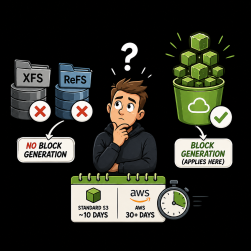
It has been observed that “block generation” sometimes creates confusion when sizing repositories, as it is sometimes incorrectly assumed to apply to XFS or ReFS-based repositories. In reality, block generation is only relevant for Object Storage repositories.
The purpose of block generation is to reduce API overhead by caching and reusing object-level block metadata, thereby avoiding repeated LIST and HEAD operations against the storage backend during incremental processing. This improves efficiency and performance, especially in large-scale environments.
In Veeam-based object storage integrations (e.g., S3-compatible targets), the default block generation retention is typically around 10 days. In AWS environments, effective retention may be longer depending on bucket lifecycle and storage policies (often 30+ days or more), which further influences how long metadata and object state remain relevant for optimization.
Thanks for reading
I hope you enjoyed this edition of my Lessi-Learned Newsletter. Thank you for reading!
Got feedback or something you want to see in the next edition? Leave a comment, write me on X (@lessi001) or connect at LinkedIn.
Want to get the newsletter hot off the press? Sign up for my mailing list and I’ll drop a note in your inbox as soon as the latest issue is ready: